Billing
- Home
- >
- Billing
Getting started with Billing
Billing shows your estimated WhatsApp usage cost, broken down by country and pricing category.
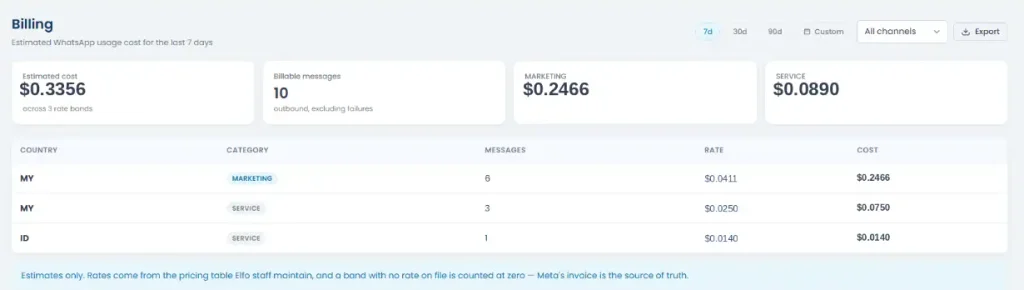
Use the date range buttons (7d, 30d, 90d, or Custom) to scope the period, and Export to download the breakdown. By default the data covers All channels, but you can filter it down to a specific connected number if you only want to see that one.
At the top, you’ll see:
Estimated cost: total across all rate bands for the period
Billable messages: outbound messages sent, excluding failures
One card per pricing category with billable messages in the period (e.g. Marketing, Utility, Authentication, or Service), showing that category’s cost
Below that, a table breaks the same data down by Country and Category, showing message count, rate, and cost for each combination.
These numbers are estimates only. Meta’s own invoice is the source of truth for what you’re actually billed.